2015-10-22

Hardware Review: Lenovo P700

This article was originally published on: http://www.engineering.com/DesignSoftware/DesignSoftwareArticles/ArticleID/10850/Lenovo-P700-Workstation-Review.aspx

Last fall, I had the opportunity to try out the Lenovo ThinkStation P300 for a few days (see full review). In the section below, where I post benchmarking results, I compare the new P700 (Figure 1) to both the P300 I tested last year and the Dell OptiPlex 790, which is still my stock daily-use computer at the office.

For Lenovo, the model number is an indication of the performance, with the P300 and P900 spanning the full performance range from lowest to highest. If you'd like to see the way the specifications differ across the range, head to their website.
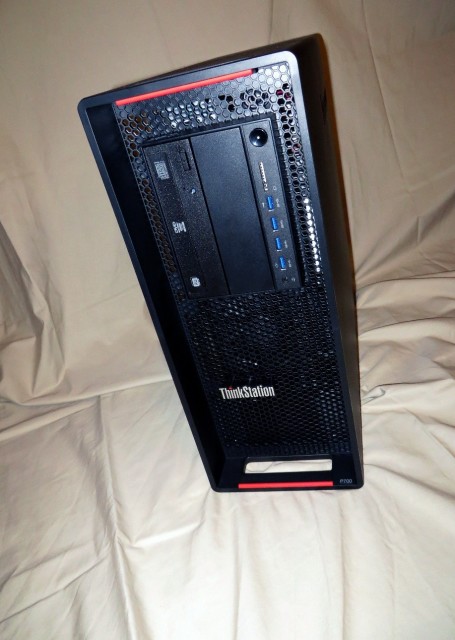
Figure 1. The P700 tower workstation from Lenovo. (Image courtesy of the author.)

Out of the Box

Lenovo’s packaging is consistently good. This machine was easy to unbox, and it was simple to conserve the foam inserts and other materials for reuse when I send it back following my review. Some packing materials open up okay, but trying to fit them back in as they came is never quite as easy as it would seem, especially the hard Styrofoam buffers that break and leave particles everywhere. Thankfully, that was not the case this time.

The tower measures 6.9 in. x 17.3 in. x 18.5 in. In addition to the case, it included a power cable, USB mouse, USB keyboard, and setup guide (which includes safety and warranty information), but no Windows media discs. Manufacturers rarely include recovery disks anymore; usually, you need to make your own after starting up the computer for the first time. There was a pamphlet inside explaining Lenovo’s conservation efforts with regard to shipping unnecessary materials, such as Windows installation discs, along with instructions for obtaining Windows 8 disc.

Specifications

The configuration of the ThinkStation P700 sent to me for testing was as follows: 
CPU: 2.60GHz 8-core 16-thread Intel® Xeon® E5-2640 v3
RAM: 32GB (Samsung 1600Mhz)
Graphics Card: NVIDIA Quadro K5200
Drive: Intel 1500 Series SSD 240GB
Power Supply: 850W

In addition to these specs, there are multiple options available from Lenovo for individual configurations, and the tower has plenty of space to add more hard drives and RAM. Of the customization options, the most popular ones are likely to be processors (1.6GHz or 2.6GHz), monitors (choice of 23 in., 24 in. or 28 in. LED), power supply (650W or 850W) and a media card drive (9 in 1 media card reader or 29 in 1).

Higher capacity power supplies are required to run newer, more energy hungry elements, such as very high end graphics boards, so starting with 650W is a good move by Lenovo and I was pleased to see the 850W installed for my review. The majority of users would hardly be impeded if a workstation came with only a 450 watt power supply, as the P300 does, but it pays to go the extra mile when you’re looking at investing in a good workhorse that otherwise meets all your requirements. Plus, it’s nice to have options.

The P700 arrived with Windows 7 x64 Service Pack 1 installed. While I really would have liked to try a touchscreen monitor with Windows 8 or higher, Windows 7 is a known quantity for both AutoCAD 2014 and me.

Before looking at workstations, know what OS and programs you plan to run on them and try to ensure compatibility. Since I am testing Autodesk software, I checked the approved devices. Not only is this a good idea with regard to performance and troubleshooting, it might be necessary to convince your IT department to spring for "non-standard" hardware.

In this case I am a bad reviewer for using 2014 software, as the NVDIA 5200 is certified for 2016 but not for 2014.

The Workstation

Some users look for an HDMI port that lets them use a television in place of a monitor. Luckily, I still had the DVI cable I'd purchased for my last Lenovo review, so I was able to hook up the workstation to the monitor in our home office with no trouble. I’ll admit that DisplayPort is superior to HDMI, due to its ability to handle higher resolutions and more monitors at once. Should you wish, you can customize your build and have an HDMI dongle included for around $30.

There are four USB ports on the front, as well as four USB 3.0 and four USB 2.0 ports on the rear (Figure 2), which should be more than enough for all of your peripheral needs. Audio inputs and outputs are available on both the front and back.
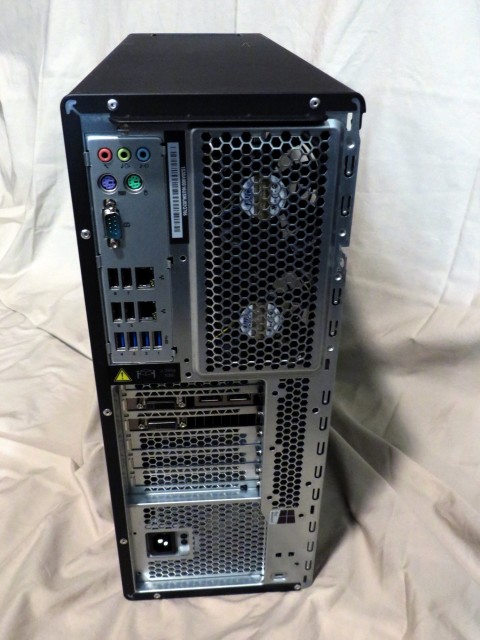
Figure 2. The back panel of the Lenovo tower. (Image courtesy of the author.)

The P700 case is even easier to access than the P300. There are no screws to deal with; you just pull a lever to release the side of the case. There is plenty of room inside for airflow and additional components (Figure 3).
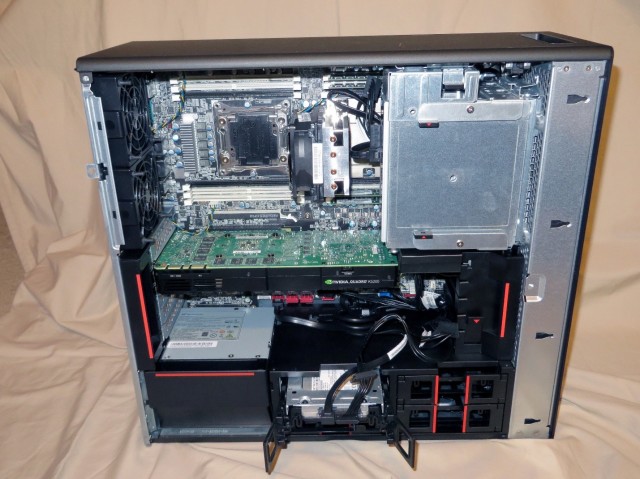
Figure 3. Inside the Lenovo P700. (Image courtesy of the author.)

Last fall, I had the opportunity to try out the Lenovo ThinkStation P300 for a few days (see full review). In the section below, where I post benchmarking results, I compare the new P700 (Figure 1) to both the P300 I tested last year and the Dell OptiPlex 790, which is still my stock daily-use computer at the office.

For Lenovo, the model number is an indication of the performance, with the P300 and P900 spanning the full performance range from lowest to highest. If you'd like to see the way the specifications differ across the range, head to their website.

Figure 1. The P700 tower workstation from Lenovo. (Image courtesy of the author.)

Out of the Box

Lenovo’s packaging is consistently good. This machine was easy to unbox, and it was simple to conserve the foam inserts and other materials for reuse when I send it back following my review. Some packing materials open up okay, but trying to fit them back in as they came is never quite as easy as it would seem, especially the hard Styrofoam buffers that break and leave particles everywhere. Thankfully, that was not the case this time.

The tower measures 6.9 in. x 17.3 in. x 18.5 in. In addition to the case, it included a power cable, USB mouse, USB keyboard, and setup guide (which includes safety and warranty information), but no Windows media discs. Manufacturers rarely include recovery disks anymore; usually, you need to make your own after starting up the computer for the first time. There was a pamphlet inside explaining Lenovo’s conservation efforts with regard to shipping unnecessary materials, such as Windows installation discs, along with instructions for obtaining Windows 8 disc.

Specifications

The configuration of the ThinkStation P700 sent to me for testing was as follows: 
CPU: 2.60GHz 8-core 16-thread Intel® Xeon® E5-2640 v3
RAM: 32GB (Samsung 1600Mhz)
Graphics Card: NVIDIA Quadro K5200
Drive: Intel 1500 Series SSD 240GB
Power Supply: 850W

In addition to these specs, there are multiple options available from Lenovo for individual configurations, and the tower has plenty of space to add more hard drives and RAM. Of the customization options, the most popular ones are likely to be processors (1.6GHz or 2.6GHz), monitors (choice of 23 in., 24 in. or 28 in. LED), power supply (650W or 850W) and a media card drive (9 in 1 media card reader or 29 in 1).

Higher capacity power supplies are required to run newer, more energy hungry elements, such as very high end graphics boards, so starting with 650W is a good move by Lenovo and I was pleased to see the 850W installed for my review. The majority of users would hardly be impeded if a workstation came with only a 450 watt power supply, as the P300 does, but it pays to go the extra mile when you’re looking at investing in a good workhorse that otherwise meets all your requirements. Plus, it’s nice to have options.

The P700 arrived with Windows 7 x64 Service Pack 1 installed. While I really would have liked to try a touchscreen monitor with Windows 8 or higher, Windows 7 is a known quantity for both AutoCAD 2014 and me.

Before looking at workstations, know what OS and programs you plan to run on them and try to ensure compatibility. Since I am testing Autodesk software, I checked the approved devices. Not only is this a good idea with regard to performance and troubleshooting, it might be necessary to convince your IT department to spring for "non-standard" hardware.

In this case I am a bad reviewer for using 2014 software, as the NVDIA 5200 is certified for 2016 but not for 2014.

The Workstation

Some users look for an HDMI port that lets them use a television in place of a monitor. Luckily, I still had the DVI cable I'd purchased for my last Lenovo review, so I was able to hook up the workstation to the monitor in our home office with no trouble. I’ll admit that DisplayPort is superior to HDMI, due to its ability to handle higher resolutions and more monitors at once. Should you wish, you can customize your build and have an HDMI dongle included for around $30.

There are four USB ports on the front, as well as four USB 3.0 and four USB 2.0 ports on the rear (Figure 2), which should be more than enough for all of your peripheral needs. Audio inputs and outputs are available on both the front and back.

Figure 2. The back panel of the Lenovo tower. (Image courtesy of the author.)

The P700 case is even easier to access than the P300. There are no screws to deal with; you just pull a lever to release the side of the case. There is plenty of room inside for airflow and additional components (Figure 3).

Figure 3. Inside the Lenovo P700. (Image courtesy of the author.)

On startup, the machine quietly hummed with very little noise. In order to emulate my everyday experience, I installed Autodesk Design Suite Premium 2014, with all software packages selected (including the programming tutorials, but only the Imperial template files for each). It took me five minutes to walk through the installation configuration, and then another 40 minutes to install the 61 components.

The Numbers

I will be comparing this new workstation with my daily-use desktop computer, a Dell OptiPlex 790 that also runs 64-bit Windows 7, but with 4GB RAM, and the Lenovo ThinkStation P300, with 8GB of RAM. All three have AutoCAD 2014 installed with the same options on Windows 7. While this is not an apples-to-apples comparison — obviously the specs span a wide range — it should give you a good idea of how the components affect performance.

The simplest way to compare systems is through the Windows Experience Index. When looking at the WEI, it is important to keep in mind that the given number reflects the lowest scoring category, so be sure to click for more details (Table 3). The scale runs from 1.0 to 7.9, the higher the score the better the performance.

Workstation
WEI
Dell
5.4 (see Table 1)
P300
P700
5.9 (see Table 2)
7.8 (see Table 3)

Table 1: Windows Experience Index for Dell OptiPlex 790
Component   
Details   
Subscore
Processor   
Calculations per second 
7.4
Memory (RAM) 
Memory operations per second 
7.2
Graphics
Desktop performance for Windows Aero 
5.4
Gaming graphics 
3D business and gaming graphics performance 
6.7
Primary hard disk 
Disk data transfer rate 
5.9

Table 2: Windows Experience Index for Lenovo P300
Component
Details
Subscore
Processor   
Calculations per second
7.8
Memory (RAM)
Memory operations per second 
7.8
Graphics
Desktop performance for Windows Aero
7.6
Gaming graphics 
3D business and gaming graphics performance
7.6
Primary hard disk 
Disk data transfer rate
5.9

Table 3: Windows Experience Index for Lenovo P700
Component
Details
Subscore
Processor   
Calculations per second
7.8
Memory (RAM)
Memory operations per second 
7.9
Graphics
Desktop performance for Windows Aero
7.9
Gaming graphics 
3D business and gaming graphics performance
7.9
Primary hard disk 
Disk data transfer rate
7.9

In workstations these days, I prefer to see solid-state drives, even in mid- to high-range laptops. (If not a full SSD, then at least a hybrid drive, where a small-capacity SSD speeds up the operating system to improve startup performance, and then a standard "spinning" hard drive for the remainder of your storage needs.) Unfortunately, cost is usually a consideration, and some options translate to much higher price tags, so you'll have to balance your priorities against your budget. If you need to be convinced, however, check out the difference in disk data transfer rates in the tables above.

As far as I know, Revit does not have any internal testing capabilities, so I do not have any specific numbers to compare for that application. If you want to try a Revit benchmark yourself, there is one available for download on RevitForum (there are older versions available on the same forum site, if you aren’t using 2016 yet).

AutoCAD, however, does have some internal testing capability. There is an undocumented application that accompanies the AutoCAD family of products, called GsTest.arx. Use the AppLoad command to load it, and then type “GsTestBenchmark.” It only takes a moment to run, then displays the results in the Command Line interface.

Lower milliseconds and higher frames-per-second indicate better results. Don’t forget to set the performance tuner in AutoCAD. It could improve your results by a noticeable amount. If you haven’t done this yet, right click the Hardware Acceleration button on the Status Bar. That will bring up the Graphics Performance dialog box where you can turn on Hardware Acceleration and experiment with different graphics settings.

Benchmark 
Dell OptiPlex 790
Lenovo P300
   Lenovo P700
3D Wireframe
919 milliseconds 
125 ms
174 ms
198 frames per second 
1,460 fps
1,044 fps
Hidden Line Removal
934 ms   
126 ms
173 ms
195 fps 
1,447 fps
1,049 fps
Flat Shading
818 ms   
125 ms
172 ms
223 fps 
1,462 fps
1,055 fps
Gouraud Shading
859 ms   
116 ms
170 ms
212 fps 
1,575 fps
1,064 fps

You might notice that the P300 has slightly better numbers than the P700. Both machines perform really well, and their results only vary 5-6 percent in relation to the OptiPlex’s slower numbers, so I am not too concerned about the difference.

For those folks who perform renderings and want some assurance on the more robust workstation’s performance in that area, I used Maxon's Cinebench Version 15.0 benchmark to compare capabilities. The P700 is clearly the better performer in terms of rendering capability (independent of AutoCAD).

Workstation
CPU Score
OpenGL (FPS)
Dell OptiPlex 790
439
  28.77
Lenovo P300
769
  119.24
Lenovo P700
1134
174.42

Summary 

I happily endorsed the Lenovo P300 workstation last year. It was a solid machine with good performance, even if it did leave a few of my personal preferences unfulfilled. But the P700 more than delivers on everything that I consider essential in performance and flexibility, and I am much more enthusiastic and unreserved about my recommendation this time around.

Melanie Perry is a freelance technical editor and an ARCHIBUS system administrator for the facilities group of a financial services firm. She also blogs about AutoCAD with facility management and conducts the annual salary survey for AUGIWorld Magazine. She can be found on Twitter at @MistresDorkness.

2015-10-17

AutoCAD 2016 impressions in pictures

My workload this year hasn't left much time for blogging, but, I've spent some time in smaller/faster formats like Twitter and Instagram just to capture some thoughts (I'm MissDorkness on Instagram and MistresDorkness & AUGIatAU on Twitter).


#ACAD2016 now supports frames on MTEXT


#AutoCAD 2016 does drag and drop for Layouts


Point clouds are much more intuitive to work with, partially thanks to Dynamic UCS in 2016.


There are other improvements that are worth reading up on...


This feature is about leaving hatch draw order unchanged... I don't know what release its from, but, it is worth mentioning.


2015-10-01

Revit Shortcut Guide

Admit it, you guys still miss AutoCAD, right? Everybody loves the command line, because typing is soooo much faster than ribbon-surfing! For you hard core keyboarders, be sure to check out this handy Revit Shortcut Guide: http://www.autodesk.com/shortcuts/revit You either have the searchable webpage there, or a downloadable PDF. Either way, enjoy.

2015-09-01

AU2014 General Session

While I always live-tweet events from my @MistresDorkness account, I take so long to edit notes that most of the time I never actually post blog articles at all, I'm terrible! But, a discussion today on the Facebook CAD Manager's group reminded me how much I enjoyed last year's Autodesk University main stage presentation.


Keynote 

Lynn Allen talked history, expanded AUs.

Innovation forums
Bldg, mfg, infra, viz, planning

AU mobile app, map, agenda, badges, connecting, checkin feeds to other social sites.
The Autodesk University app was really good in recent years, I used it a lot and made some new connections.

Fantastic opening sequence...

CTO Jeff Kowalksi
Technology improving on providing context, such as a gear knowing other parts it works with
Stop telling the computer that to do and start telling it what we need.

Generative design, mimics natures approach, starting with your goals, working through generations of ideas to reach the best solution.
Showed medical applications 

Planned obsolescence... When products are completed, they begin to die.
The idea of creating items that will engage with the world and change.
Sense, respond and collaborate.

Carl Bass (@carlbass)
Computers are the driving force in how the way we make things has changed.
The real world and digital world affect how we make things, technology is breaking down the barriers between the two.

Collaboration is not an afterthought, it will always be built into our products 
Collaboration across platforms
It should be natural and transparent, not an added task on top of your other priorities 

3d printing has a way to go
Spark - application- spark investment fund 100mil
Integrated software and hardware would simplify the process.
Ember now available for preorder (Autodesk 3d printer)

CNC is older tech, but, still valuable.

BIM 360
Digitization of building construction process

Emily Pilloton @ProjectHDesign
Exciting work teaching tech to kids.

Why are we building?
What are we building? Personal and community significance 
Who is creating and designing and building and leading? Anyone.
How do we use the skills and competence we've learned?

#au2014 "we have a responsibility..." to put these (design / construction) tools into any hands! http://t.co/WWz5ONQrI0

2015-04-27

Happy 10th Anniversary to the Dork Side!

Thanks to CAD Panacea, I had a little reminder that my blog has just turned 10 years old. Evidently his first blog post was on my 25th birthday, and mine came about two weeks later.

 It's been an exciting decade for me (and, luckily, not exciting in all of the awful ways of the preceding decades). I was tickled to look back at my first post, which gave the history of my naming of the blog. This week, I was discussing a FitBit challenge with my boss and had to give him my personal email address... which got the expected disbelief, followed by eyerolls. Listen!!! Nobody ever remembers my name, but, they do NOT forget my nickname once they've heard it. 

 Back in those days, I was heavily involved with the Gateway Autodesk Users Group, which I'd founded along with Brian Myers, after we met through the AUGI forums and wanted more local ways to learn and network. That group pretty well fizzled when I stepped down as president upon the birth of my second son. Brian and I are both peripherally involved with the Revit Users Group, headed up by Chris Link. We were happy when he approached us for advice on getting things going again, and he and Ellen Smith and all of the other local Revit gurus who serve on the advisory board and organize and present at meetings are stellar! I miss the cross-industry nature of GAUG, but, things go how they will. 
At any rate, I used to edit the monthly newsletter of that group, which ended up going out to people around the world, instead of just our bi-state region as I'd expected initially. Herding authors and laying out articles takes a lot of time though, so I switched to blogging as a simpler platform. 

I had also just gotten involved with doing the AUGI Salary Surveys, which I've never let go of. It is a year-round job, and probably a lot less necessary than it used to be, with the advent of so many other salary resources, but, it is near and dear to many hearts and provides a good long look at the state of our industry and disciplines. 

Despite my increased involvement in the industry, a whopping 5 years into my career, I didn't know diddly then! I've learned an unbelievable amount in the intervening years, and I'd like to thank everyone in my industry and at Autodesk and other firms and on all of the forums who have provided me with endless opportunities for insight. 

And, thanks to the Beta forums and Ellen Finkelstein and diverse others, I have worked as a Technical Editor or coauthor on 16 textbooks for three different publishers, as well as having had columns in CADalyst AEC Tech News, HotNews TipNiques then Polls and Surveys, and AUGIWorld Magazine Forum highlights. As well as random articles in CADalyst Magazine, AUGIWorld, CADdigest and Engineering.com and assisting in labs at Autodesk University, and a string of speaking appearances as a BIM for FM panelist.

Since I started a new job at the end of 2013, I have been working longer and more stimulating hours as a system administrator, so my blogging volume has never fully recovered from it's pre-university days and I have cut back drastically on the freelancing and consulting I do. 

I have taken to tweeting and Instagramming tips as I think of them, usually with the aid of my #CADdork (aka, 'Lego Me' from the hard-to-find lady scientist set, look, she's got a mole and everything!).
I do still stay involved with the Autodesk Users Group International, giving back to the community that has given me so much!
I am now in my 5th year (of 6) serving as a Director and an Officer of the Board... because I'm obviously a glutton for punishment. 

 If you would have asked me back in college how my career (and life) would turn out, I would have had no clue. 
Who could have seen this coming? In the past 10 years, I've started managing projects (construction and IT), been published (and paid for it), started implementing BIM (for MEP in FM), gotten married to a fellow CAD dork, maintained 6 plotters and two large format copiers, flown to Europe three times, finished a bachelor's degree and started a master's, bought a house, had an iPaq, three iPhones, a Kindle, an iPad a FitBit and two 3d Mice and made one major career change (still FM, aw, no more BIM!)... and, so much more. 

Here's hoping I can keep writing about it for the next 10 years at least.

2015-02-26

How to get started in Social Media

Yesterday, I shared my basic philosophy about leveraging social media in your professional life. 
The essence of which is basically: make yourself available.

Getting started:

1. Sign up for all of the popular accounts. 
Use similar naming and the same headshot, so people in your industry can recognize you when your networks overlap, and make yourself easy to find (or more likely to show up as a recommended connection to others).

- Naming: I started out on forums 15 years ago as Wanderer, but, for the past 10 years (since I started this blog), my primary branding has been with the nom de guerre "Mistress of the Dorkness". I could just use my name, but, let's face it, no one gets my name right. Melissa, Melinda, Miranda, Madeline... Natalie? Christine? Or, even just being confused with another young brunette Melanie in our industry. It was a hopeless case, I had to go by something more memorable.
- Headshot: I know, you're not a model, you're probably a very pragmatic down to earth guy who doesn't even like having his photo taken. BUT just follow my advice, it won't cost you anything. 
- Profile: Complete your profile. Provide basic industry data with a bit of experience and personality. Have all of your contact data pointing back to a single, dedicated personal email address for simplicity's sake (and don't forget to check it at least multiple times per year, opening emails to keep addresses from being placed on an unresponsive or invalid list). If there is a field, fill it out (and use spell check), don't leave blanks.

2. Connect with others.
LinkedIn? Look up your local colleagues and send connection requests.
Twitter? Look up profiles of Autodesk or AUGI and start following some people that follow them, or those they mention or retweet. Or, just find one Twitter guru and follow a "list" they've created, so, the people they find most worth interesting are curated for you, no following required (though that does cut out some reciprocity, following would let those people know you're there).
Forums? Find the topics that interest you most and either create a shortcut for quick access or subscribe to email notifications for new posts (for me, the essential is the Facilites Management forum http://forums.augi.com/forumdisplay.php?519-Facilities-Management-In-Practice ).
Google Plus (G+)? Search the networking site for industry key words, or, ping a guru and ask them to share an industry-related Circle with you.
Facebook? Some people keep this for personal connections, and I respect that, however, loads of people started off there with only professional connections and spend loads of time there. Since my family and friends showed up, I've started posting more personal content and less shop-talk, but, it's still great for work topics. I recommend Robert Green's "CAD Manager's Unite!" group for some good folks to converse with and learn from.

3. Consume data.
Find a few minutes here or there to see article titles. Most you'll give a pass to, others you'll read and learn something from.

4. Share data.
Occasionally share content you found interesting, or create your own. 

Just resharing an interesting article (or infographic or forum topic or photo of a local project, etc) can establish you as someone who understands the industry.

Have more time to share? 
Find a blogger who covers your industry and offer to do a guest post. Or, contact a content manager for AUGIWorld and see if you can offer something there. http://www.augi.com/augiworld/augiworld-content-managers Those articles can serve as pointers back to you.

5. Check in on a semi-regular basis. 
Sure, you could cycle through each site or app.
But, that single email address I recommended? Minimum, just run through there once a week, to see if you've got PM's, Facebook mentions, LinkedIn group notices, Twitter @ replies, G+ tags or whatever. 
Just be available and be responsive, you don't have to read it all or create it all, just touch base and be accessible.

I can scroll through the most recent 30 Google+ posts or 75 most recent Twitter posts in the time it will take me to reheat leftovers for dinner tonight.

6. Go Advanced.
There are websites and apps that will push updates to all of your social media accounts at once. 
I don't personally use them, but, those folks in our industry that are true social gurus do. Minimal effort for maximum exposure. No pressure either way, do what you feel comfortable with.

Why?

Networking. 
Professional connections are pretty invigorating to me (believe me, I'm a hardcore introvert who typically prefers the company of books to people, so, I'm as shocked by this as you are) and seeing other people excited about their projects opens my mind to the ways I could change or improve my own work and brings back some of that starry-eyed excitement and those dreams about the potential inherent in every problem we encounter in the workplace. 
We spend so much of our time working, we should find ways to make that as enjoyable and fulfilling and productive as possible.

Also? Work.
Money talks, right?
*I met local gurus and found a support network because of starting a LUG with someone I met on the AUGI forums. I was a know-nothing kid in a niche industry, but, I could still help bring people together, even though I lacked technical knowledge at that time. 
*I got my first two contract gigs (working on books) because of this blog and my profile in the Autodesk beta forums.
*I got another contract gig because of my MySpace profile (yeah, I'm serious).
*I landed a recurring gig with a publisher because I reached out to one of their authors via Twitter when he was at AU and tweeted that he didn't know anyone, he made introductions as a thank you.
*I have my current job because of LinkedIn (and I've also been headhunted there numerous times).

Basically, I had a contact who was working as a consultant, when he left that company, he was contractually forbidden from contacting me, as a client or as a potential employee (as I'd been in the process of interviewing with them). A couple years later, when I had questions about his specialty, I searched for him on LinkedIn and reached out to him there. I interviewed at his new company, but, it wasn't a good fit at the time. BUT, a couple years later, when one of his clients was looking to create a new position that was right up my alley, he made the appropriate introductions, and here I am!

If you want the chance at new experiences, you have to try something different. For me, social media has been a great tool to make friends, network, expand my skillset and grow my career.

Do you have a social media success story? Please share!


How to keep up with social media?

It's no secret that I have been an eager adopter of social media platforms and forums, from AOL chat rooms to MySpace to Twitter and G+ and more.

Because of this, I've often been asked (by those who want to leverage exposure or networking tools or learning opportunities) "how do you keep up with social media?"

The honest answer I always provide is... I don't. 
Do not worry about consuming all available data on a platform (or platforms). 
It's simply not possible, so, don't put that pressure on yourself, you'll be too overwhelmed to even get started.

To me, all these platforms provide essentially two things:
1. An access point to people
2. An access point to topical data

To get started, you do NOT have to commit to huge chunks of time. 
All of the time I spend on social media are stolen moments; standing in a long checkout line, waiting for water to boil, during commercials, while non-essentially participating in a conference call, etc.

If I have a profile somewhere (Twitter, AUGI, LinkedIn, et al), then people who spend time on those sites can see a resource that reminds them of me or see a question I could possibly answer, and easily locate me and loop me into the converstation 
I don't regularly give out my telephone number, never have, never will, BUT, anyone can get ahold of me if they want to because of my presence on so many popular sites.

Working in a tech field means things change rapidly. Exciting projects are started and finished every day. People change companies and industries. Laws pass or lawsuits affect how we buy or sell things.
Being a part of many networks is the only way you can be exposed to all of this change.

In tomorrow's post, I'll give you some simple tips to get started leveraging social media for professional benefit, and some examples of how my social presence has benefited me.


2015-01-28

A day in the life Blog Roundup

Alright, time for the blog roundup of all of those who took the time to document their day.

Feel free to also check out the hashtag #CADdork on Twitter for some play by play from a few other people, and the other social platforms for a few random comments.


Todd Shackelford - BIM Manager

Robert Green - Consultant / Trainer

Mark Kiker - Director of Information Technology 

Dean Saadallah - Associate Principal 

Luciana Klein - Consultant 

Brian Benton - Senior Engineering Technician 

Paul Munford - CAD/CAM Manager 

Robin Capper - Retail Design Manager 

Melanie Perry - Sr. Facilities Management Systems Specialist

Brian Myers - MEP Technology Director 

Thomas Rambach - Mechanical Designer

Please let me know if I've missed any, I will happily add a link... I know not everyone who wanted to participate yesterday was able to, so, send me your link when you get a post on this topic published.

2015-01-27

A day in the life of a CAD Dork

I've been reading the #CADdork (day in the life of a CAD/BIM blogger) posts by some of my favorite authors today, and look forward to perusing the rest. I'll post a link to them, I believe Todd Shackelford is planning on doing the roundup.


Working in Facilities, I don't always get a predictable day, but, that's part of why I like it. Also, in my current role, I'm primarily tech support as the administrator of our CAFM/CMMS, but, like everyone else in my group, when anything needs done, one of us steps up to do it.

Thinking of my regular tasks, I didn't lay out any potential renovations in #AutoCAD today, which is fine, because when my coworkers watch me CAD, it makes me self-conscious. I didn't really do any reporting (think of me as the Penelope Garcia of Facilities). I didn't do any programming or user training (I've got some upcoming changes to our maintenance module, so I'll be in touch with a few users to get them up to speed and ease them into the differences then). No new account setups or role changes.
I DID do some tech support, data verification, table auditing and helped cover some work for a vacationing coworker.
We don't have a lunch break at work, just all eat at our desks, so breaks are taken when we have a lull in our activities.

Usually I am home by 5pm, helping with homework and cooking a full meal most nights. We have an open plan, so, I can see and speak with the family while I work. I enjoy cooking, it's the only creative thing I really do well (that and I'm a super picky eater). 
After dinner, we enjoy movies and Netflix marathons while we catch up on our games, make jokes at each other's expense and enjoy the dark and relative quiet. I check into AUGI accounts all the time, very much embedded into the community and happy to be a part of such a fun group of members.

If I've had too much stimulation during the day, I tend to stay up late after everyone else retires and read because I so seldom have any time alone.
Of course, I read (fiction only) every night before bed, always have, always will.

Full details of my day below.

6:30 Get up and check personal & AUGI email and other social accounts.

7:00 Morning ablutions.

7:10 My husband is already up, making lunch for the boys and starting a pot of joe. Grab a cup from the still-brewing coffee, kiss the family goodbye & head out.
I blare music during my commute. No talk, no news, just music.
Today? I was feeling 90's. 

7:50 ZOMG, traffic is uncharacteristically horrible, sitting on the interstate. 
I hate being late. Message my boss to tell him I won't be in on time.

7:55 Traffic finally opens up.

8:15 Arrive at work. I really prefer to get in earlier, to have some quiet time before people start arriving, getting a handle on planning my day (whether I'm given the luxury of following that plan is not something I can always control ;) ).

Here is my cube, I hate paper, so, it's mostly filled with swag to distinguish me from the non-IT people that surround me:

Check my email, and the two mailboxes I'm covering while our Corporate Facilities superhero is on a week+ long vacation.
~sniff~ Including an email about the Archibus Nexus conference, that I can't go to because it's (once again) not in the budget. I'd love to take the system integration and reporting classes there, as well as see what other users are doing with their systems.

9:00 breakfast. Leftover chili (variety of beans + quinoa, very filling).
Eat at my desk while trying not to strangle a nearby cube dweller who has their phone on speaker, they're on hold. The looped messages are annoying.

Take a swing through www.forums.augi.com and check the moderation queue for posts that need approving, reply to PMs from other mods, no action today in the moderators' forum. Read posts to see if I can answer any questions.
Try to check the adesk cad manager's group, but, it locks up on me, too much for my attention span (or lack thereof).

9:15 Pull up Citrix to log into Archibus thick client.

Yesterday I was asked which conference rooms in our corporate buildings are restricted (used exclusively by one department, or presently out of rotation because of being utilized as a workspace).
That information is not currently being tracked in our CAFM system.
So, today I added a room type for restricted conference rooms and will be adjusting the records as I can, it'll piggyback on a recent audit I did, whose results I'll go over with my coworker when she returns and digs out.

As long as I'm in the room types table, I see there are description formatting inconsistencies with 10% of the room type descriptions, and 30% of the room types have no floor plan highlight colors assigned, so I rectify those gaps.

9:45 I've been sitting for 2 1/2 hours already today and just received a FitBit taunt from Frozen Layers.
So, I'm going to run the stairs and get some coffee.
Alright, 10 minutes = 600 moderate steps. I needed that break, too.

9:55 Check the employee starts/moves that need processing, chase up managers when no locations are given.

10:06 a coworker walking by is discussing TMI medical stuff. That's lovely.
~trying to carry on filtering data~

11:00 Heard back about the questions I had regarding restricted rooms in our main buildings and pulled up some floor plans to categorize them all.
12:00 sent off summary spreadsheet to my VP along with a couple of changes I'll be making in our database to account for this. I miss our Corporate Facilities superhero, she could tell us without running a report.

12:15 walking downstairs to see if there's anything decent looking in the cafe.

12:30 The roasted veggies looked nice so I grabbed a variety. I eat while popping into the AUGI forums again. Hint: I always keep chopsticks at my desk, makes one-handed eating simpler. Not very filling, so I'll have a protein bar later (if you visited me & Uncle Bill at Autodesk University, these are what I bring with me in the case of weird foods or a too-busy schedule when I travel, I keep a box in my cube for busy days).

12:45 I'm finished with lunch and email, procrastinating on working on the occupancy plans again... but, as my alternative is to work on the Processes and Procedures manual for my team, which my manager just put me in charge of (since I can't keep my big mouth shut)... I dig into the employee movement records again.

12:55 Call about emergency project in another building. Plan done and sent off to create project.

1:10 Back to occupancy plans.

1:30 Call from my Archibus business partner (Talisen Technologies). We try to meet once a week to go over outstanding issues and troubleshoot my code, because I'm such a noob. Just a quick touch-base today, we'll reconnect next week and put out fires by email.

1:40 Tech support visit from the Real Estate Manager, a cache-clearing resolves it. 
I copy out the log file to peruse later to investigate a timeout issue she's having.

1:50 Mental health break. Coffee. Hide in the bathroom.

2:00 Back at desk, I open up AutoCAD to a drawing I was playing with (a polyhedral desk calendar... lady-geekified).
2:03 Met with Branch Facilities superhero to brainstorm on the issues we're covering for our vacationing coworker.

2:30 Check on progression of moves.

2:40 Back to occupancy. Verifying which people have left this week, or consultants whose contracts have ended or been extended.

3:50 Run update routine to populate Department into the rooms, from the new occupants, or freed up due to departures.

3:55 One last run through the mailboxes. I would normally stay a bit later to plow through more of this, but, I have a meeting in Clayton at 4:30.

4:30 Settling in at the Christner office training room, with some of the most awesome local talent for a RUG steering committee meeting.
Chris Link and Ellen Smith led the rest of us in talks about meeting frequency, networking event locations, topics, resource collaboration (such as skills requirements and PxPs), division of labor with more frequent meetings and sponsors. The St. Louis Revit Users Group also wants to beef up its social media presence, sharing our content and keeping in the forefront of members' minds so they don't miss any events they're interested in.

5:30 Meeting breaks up, discussion on cloud collaboration setups and options breaks out. Interesting stuff. Everyone is working on interesting projects. Oh, drumming up support and authority from leadership was another sidebar.

6:00 Leave and head toward home.
As I leave, I think how disappointed I am that no one at all noticed my One Ring earrings today.


6:25 Stop at grocery store. 

6:45 Home at last. Unpack groceries, sort mail.

7:00 Dinner in the oven (toasting breadbowls for leftover chili).
7:08 Family eating.

7:10 Some alone time on my elliptical.

7:40 I'm a wuss and my foot hurts. Shower time.

8:00 Getting my kindergartener ready for bed.
I'm very proud, he made his first pun today (it involved farts, so my husband is also very proud).
"I want to be somebody new" is our bedtime story. His reading is progressing quickly.

8:20 Eating my dinner. Taking some hits on my guild monster, I was a terrible slacker missing battle this evening, gotta make it up to my guildies before my DH finishes shaving and starts up our movie (we're watching Serenity tonight. It took some work, but, I've made him into a huge Firefly fan... he's even got Jayne's Blue Sun shirt and everything.).

8:40 Livingroom time. 
If I'm doing any blogging or specific AUGI projects (like surveys/polls), this is when I'll tackle it.