2005-08-30

yep, I'm on vacation again!

I am heading out for vacation tomorrow morning, so I won't be posting much again for about a week. I have been a little scarce on here since I got back from my last one, I know, as I've been SWAMPED from the two-week backlog. In fact, I just got caught up from that this morning.
Just in time, eh?

I will be heading across the puddle and spending some time the uk/ireland. The trip promises to be a lot of fun, I haven't been to Europe since the early 80's, so I don't recall much of it.

I purchased an iPod to help relieve boredom on the long flight, and I've got a spare memory card for my camera and lots of pictures.

Have fun working while I'm away... 

2005-08-23

Ergonomics / Writers Wanted

I was just working a cramp out of my shoulder, and recalled an article I'd written for the ICC newsletter last December about proper office ergonomics, which also came to mind as a portion of our safety training here last week.


Ergonomics
Does your back hurt at the end of the day?
Do you get pain in your wrists and elbows from working at the computer?
Here are some signs that your work space is not ergonomically sound:
Shooting pain/tingling sensations in arms, legs or neck
Numbness and feeling lightheaded
Squirming, you just can’t get comfortable
Popping joints


The first step to working safely is looking at your work space. Your company might have a safety department that can come out and offer suggestions and guidelines to relieve the effects of some poorly designed setups.
OSHA has some suggestions on identifying potentially harmful working conditions.
http://www.osha.gov/SLTC/computerworkstation/solutions.html

Assessing your equipment setup:
Check out your chair height to make sure that your elbows are at the same level as your keyboard
You should have an adjustable chair that fits you so that your circulation isn’t being cut off from dangling or bent legs.
Most chairs don’t have adjustable lumbar support, but, they really should.
Your keyboard should be directly in front of you, not at an angle.
Your monitor should be directly in front of you, so you don’t have to bend or twist to look at it.
The monitor should also be able arm’s length away for proper viewing to minimize eye strain.
Do you have room to comfortable move and stretch your legs under your desk?


Assessing the way you work:
 

Make sure:
your wrists are straight
your arms aren’t extended
your neck isn’t bent
your back is supported
your lower legs are supported
your feet rest solidly on the floor
Accessorize for Comfort:
Wrist rest for your keyboard
Wrist rest for your mouse
Angled footrest to relieve pressure on the back of your legs
Hands-free setup for your telephone to minimize neck pain from tilting your head to hold the phone

Keep moving:
At least once an hour (preferable every ½ hour), take a break to stand up, stretch, and walk the kinks out for a couple of minutes.
If you are totally engrossed in a project, this becomes even more important, because you are focused, and your limbs are going to be under even more strain than usual.


Roll your shoulders forward and back, and push your shoulder blades together.
Try ½ pushups, by leaning against a filing cabinet, a set of 10 a couple times a day will keep your shoulders loose.
Don’t forget your eyes! Follow the 20-20-20 rule, every 20 minutes, blink 20 times, and stare at something 20 feet away to minimize eyestrain.
You might also want to talk to your eye care specialist to ensure that your glasses/contacts are appropriate for this type of work.


Join one of the discussions on repetitive motion strain on the augi forums: http://forums.augi.com/showthread.php?t=11656
http://forums.augi.com/showthread.php?t=11606&highlight=mouse

2005-08-15

Hardware: MP3 Player and USB Hub

Ok, I’m pretty torqued off at myself right now. I was trying to copy my (very wordy) post to finish it offline, and accidentally hit paste instead of copy… ~argh!!!

So, I am trying to keep up my rep as a tech fanatic, but, I have been doing rather poorly at that lately (I don’t even have a desktop pc at home, and my quest for a convertible tablet pc here at work isn’t going as quickly as I’d hoped), but, with a 12 or so hour flight coming up at the end of this month, I’ve finally justified the cost of an mp3 player for myself. I’d already spent some time cruising some sites trying to familiarize myself with what is available (best buy and amazon for example).

This Saturday morning, I packed up my 2 year old (note for next time, I should have brought some duct tape to keep his hands off the electronic goods) and went up to Best Buy to make my final decision.
What do you need to consider when purchasing an accessory like this?


Size – Common ranges appeared to be from 512mb to 20gb
Additional Features – Games, contact lists, display screen, color screen, jpg viewing, etc
Looks – Size, shape, color, accessories


I figured I did not need anything more than 6gb, more likely less, and, in syncing up during lunch today, I saw that I had about 4.3gb of music on my pc. I ended up with the 4gb size, and just removed a few ‘I couldn’t care less’ albums and was good to go. 

4gb is advertised as providing 18 hours of music.

I knew I needed to have a display screen. I drive myself nuts when listening to music and I can’t recall the name of the artist or the song title, so I HAVE to be able to see the information. I could not really care less about having a color screen. While I would gladly take an mp3 player which displays pictures on-screen, I am not willing to pay more for it.

Okay, I put this at the bottom, but, we all know… cool sells… 
That’s why we are nerds, not because we care about the technical advances each electronic device represents, but, just because it looks neat! So, the display screen, hard drive size and wide availability of accessories had just as much to do with my decision to buy the iPod mini as the fact that it comes in a metallic pink color with a white holster.

Shuffle sure keeps you on your toes. The last song was by Willie Nelson, the previous was AC/DC. This is why I love technology, because I have ADD! ~ponders~ or, perhaps I have ADD because I love technology... hmm.

Once I made my purchase (an extra $50 gets you a 3 year warranty, which includes the replacement of batteries, which cost about $65 from Apple and I’ve heard they might only be good for about 18 months. EDIT: 6 years later, my battery has still not failed, what a waste of money that warranty was.), I got home and unwrapped the box like a kid looking for the chocolate bunny rabbit in his Easter basket. Oh, yeah.

I don’t like to look at the instructions when I am trying something new. 
I like to test how intuitive it is. I figured out pretty quickly that pressing the center of the little round keypad turns the device on and selects menu options. It took me a little longer to realize that you move up and down through the menu by moving your finger around lightly in a circle. Clockwise for down and counter-clockwise for up (I wonder if it is the same for iPods sold south of the equator?).

The menu was simple to navigate, and I set up my clock, etc with little trouble.
 

Coming into work today, I installed the interface software. You use iTunes (or a program like YamiPod) to move music from your cd’s to your hard drive and from your hard drive to the iPod. It took me a little while to figure out how to add my mp3’s to the library, then a little longer yet to figure out how to remove tracks from the library (unchecking them doesn’t do it, you have to right-click and select ‘clear’). Plugging in the iPod automatically starts the synchronization process. You can use the iTunes player to set the sync options for the device; syncing everything on plug in, or syncing only certain playlists. That was not too hard even for me to understand.

I am pretty happy with the purchase (I wouldn’t have minded paying less, but, that goes for all things, I suppose), it is cool and was pretty easy/intuitive to set up. I also got the armband to wear my iPod while I’m out jogging, so, no bulk or skips like from the cd walkman, or flipping cassettes.

Which brings us to our next dilemma, as I photograph my iPod with my digital camera and want to upload the photo as I’m syncing my music library! I need more usb slots, since I also have my thumb drive, printer, external dvd-rom, and the lesser-used iPaq and metapass vying for top spots. Most new pc’s have more than 1 usb drive, mine actually has 6. Four are in the back, and two are recessed into the front of the machine. The front access are obviously my favorites for the smaller peripherals.

Even worse is my laptop, which has only 1 usb port, which prevents me from using my scroll-mouse in conjunction with anything else (thumb drive, external cd drive, printer, etc). ~argh!~ So, I went to Radio Shack and purchased a 4-port usb hub for about $10. It plugs in with a flexible extender, which should prevent interference with my power cord (an aggravating problem with my jump drive).

So, my craving for a new toy has been satisfied for now (twitching subsides).

2005-08-12

CAD News and a couple handy tips!

I never did get a chance to post while I was on vacation. Yep, you guessed it. Too busy relaxing. Ah.

I'll be taking another week off at the end of the month... in order to recover from coming back to work after having taken that two weeks off.


Now, on to the CAD stuff...

http://www.augi.com/autocad/ballot.asp
One of the things we are working on is more than one Top 10 list per year! We are hoping that up to three times per year you will be able to vote on your favorite wish list items! These will be presented to Autodesk throughout the year so they can work these into the design process. We are also looking at streamlining the way you submit your wishes. Just fill out a quick form and that's it. There will also be a thread created to discuss the wish if necessary. With a little bit of luck, you will see these changes very soon. – brenda richardson, autocad community wishlist manager

CADzation is giving away a trip to AU! that includes all registration fees, hotel, and domestic airfare. In addition to this, Grand Prize, CADzation is giving away 50 first place and 250 second place prizes.
The last day to enter is September 30, 2005 and the winners will be selected on October 10, 2005

I’ve seen this little gem mentioned in a couple places places recently, most recently in cadzette.
"\Bin\acadFeui\support\CADManagerControl".
To run, simply double click on CADManagerControl.exe. If you have more than one Autodesk software on your system, you will be asked which seat of software you want to modify.


Lee Ambrosius, CAD programming guru (and all around nice guy), has links on this page to articles or code that he’s written for a publication.
(don’t forget, you can have lee for your very own, check out his available services
here.)

Here’s a link to Tracy Lincoln’s blog for tips on copying and pasting accurately.

2005-08-08

FM Classes at AU in Orlando this winter!

http://forums.augi.com/forumdisplay.php?f=519

Alright, as promised, Autodesk is providing some more in-depth classes for the FM caddie this year at Autodesk University.
  • Developing Facilities Plans with Revit
  • Chargeback Reports: From CAD Dwgs to Database Reports
  • Enterprise Integration with FM Processes
  • Tips and Tricks for FM
  • DWF and Effective Facility Information Mgmt
  • How to Win Executive Support for Facility Automation
  • Reduce the Overall Costs of Managing Your Assets
  • How to Publish Building Information to the Web Using MapGuide
  • The Facility Manager's Dream
  • Model for Managing FM
  • Build a Graphical Facility Phone Directory
  • dbConnect for FM
  • Intro to dbConnect for FM


These are all of the FM specific courses, way better stuff than in the past, and last year there was an industry meeting just for FM for the first time, hopefully it will be bigger and better this year. Check out the rest of the class offerings in the link below. 


I have attended Autodesk Univesity for the past four years, and even when there hasn't been FM content of interest to me, there is enough general design, cad management, and standards management information to keep me busy.http://www.autodeskevents.com/au2005/index.cfm?action=session.list&trackID=0


Hope to see you there!

2005-07-21

Going... going... Xref Filter


Gone... in about 15 minutes.

I'll be on vacation for about 2 weeks, going out to visit the great Northwet (no, that's not a typo). 
I am looking forward to a little time off. I might pop up and post if I find some time. I might be too busy laying around doing nothing, though. ;)


Again, I wanted to have some sort of 'wisdom' to impart... but... alas...

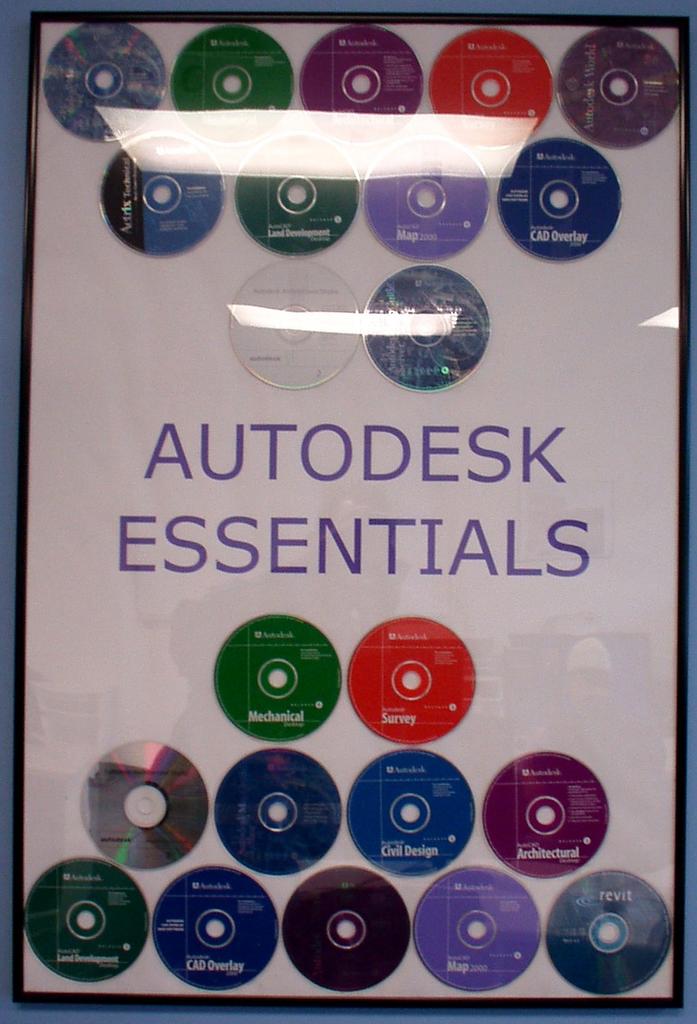
I have included this picture that I was given by Jack Hopson (he's an instructor at a local tech school who has been very supportive of our local users group). Yes, that is of a bunch of Autodesk product cd's... now THAT is a work of art. 


External References


I do have one handy thing to say about xrefs in 2006. If you don't want to see all of the x-ref layers in your layer dropdown box, go into the layer dialog, and in the pane on the left-hand side where you see the filters, select the one which says Xref (if there is more than one file attached you'll see a + to view the layers separately, or all together), so you select that filter, then go down to the bottom and choose to invert the selection and apply to the toolbar. 


Happy CADDing all, I might post some pictures on my return. 

Speaking of pictures, the Annual Photo Contest is occurring here at work... I enter ever year, and every year I lose. This year, I have a digital camera, so I won't be hampered by the whole waiting/developing, etc delay. Wish me luck. 
It's not just winning the iPod (although I'd like to do that and I hope it comes in pink), it's having bragging rights over the medical staff.

2005-07-20

Funny thing... Don McMillan

As you may or may not know, I'll be going on vacation for a couple of weeks, starting this Friday. So, I do my usual run of the newgroups before work and during lunch. This is how I normally come up with ideas of questions that people are asking, or repeating problems, etc, to post up here. Since I won't be posting much in the coming weeks, I wanted to find something like really good, really helpful in order to help you! ease a little autocad frustration...

But! I got nothin... ~shrug~ what are you going to do?

So, if I can't help expand your mind... I will help you relax with a little laughter... 


So, as of last year's AU, the following is my favorite comedian of all time (sorry, George, you're out)... Don McMillan, engineer turned stand-up comedian. You can download a little video clip of his routine as well as see a couple of his powerpoint slides up on the website. 

http://www.technicallyfunny.com/

"Don: Plain & Tall" was awarded "Best Feature - Comedy" at the Back East Film Festival. The movie will be showing in other film festivals throughout the year. Don has also appeared in the feature length films: "Air Bud III—World Pup", "Life Without Dick", "Macon County Jail", "Party Crashers", and "Fanatics". Don has guest starred on the TV series Star Trek: Voyager", "Babylon 5", "City Guys", and "Step by Step". 
He has also been profiled in both "Entertainment Weekly" and "TV Guide".

So, go over to his site... check it out, order a CD. I think his two cd's are only 10 and 12 dollars apiece, so, WELL worth it. 


I've raided my internet explorer favorites, for some other humourous sites, and pasted some links below... enjoy.

2005-07-18

CAD/Tech Blogs

Assuming you are here reading this because you like blogs... here you go, all of my shortcuts for CAD and related blogs out there... if I've missed any good ones (which I'm sure I have) please let me know by posting a comment or sending me an email...

I've tried to sort them alphabetically by the name of the blog, or by the name of the addy... I thought about trying to sort them by product or field, but, that would be too complicated for those that cross over at a given time... 


CAD Blogs


To help you keep a handle on it all…

2005-07-15

Wishlist for AutoCAD

Some may or may not know that AUGI (user group officially recognized and supported by Autodesk) turns a product wishlist over to Adesk every year at AU.


So, all year long, AUGI members post things that they'd like to see in an upcoming release, and other users provide feedback, ask questions and rate the wishes in the Wishlist forum.

BUT! Did you also know, that sometimes Autodesk representatives post questions in there to gauge user opinion? 


If you aren't a member of the beta program, then this is a easy way to provide your real-world experience to the right people.


Also, here is a link for Bug Report Submissions, and don't forget to send in your crash reports when Adesk fails, and provide as many details as you can so the programmers can find the problems.

Hope everyone has a safe and happy weekend.

2005-07-14

Connecting Moonlighters with Clients & a Few Handy Links

Was cruising the classifieds forums over at the Autodesk Discussion Groups today and saw a note for this website: http://www.cadground.com/

Evidently it is a way to hook up freelancers with projects. A customer posts a job, notifications are sent out to the registered drafters who look it over, see if they're interested, respond with a price quote, then the customer picks a contractor from those who respond to their ad.

Sounds very interesting, as I've been told one of the hardest parts of being your own boss is drumming up business.

I wonder how this works... looking around, there is evidently a feedback system where you can give feedback on the service, the customer or the drafter.

I'm wondering if there are fees associated with this, and I haven't come across that information yet. Would the drafter pay to have the opportunity to bid? Evidently you can post your project free of charge as the customer/client, so I would imagine the drafter has to pay for this.
Wait, wait, I found it... when you choose registration, you select whether you are a client or a drafter, then you see the terms... the fee is $99 per year, and they DO NOT ask for any percentage of your fees.

I think this is a very, very interesting setup. Very cool.

Has anyone used this service or another like it?

Looks like some users have tried it and were convinced networking yourself is the best way to drum up work. 


Misc. Links and Resources -